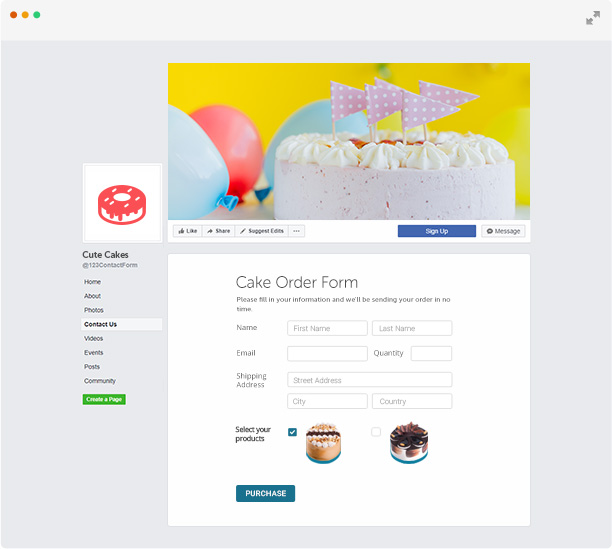
Contact Form for Facebook
Some 123ContacForm users asked us how to put a contact form on the Facebook page. It seemed a simple task, but when it came to do it, we saw that it is not that simple, as Facebook allows you to modify the page only using some Facebook applications. Of course, we managed to do it, and answer our customer support emails, but we thought it would be useful to also write here how to do it.
We will assume that you have a Facebook account, and a 123ContacForm account (it’s free, sign up if you haven’t already). Then follow the steps described below:
- add 123ContactForm Application to your Facebook page.
- this will automatically create a new menu option and open the App configuration panel.
- select your form and the destination Facebook page
- click Add
Don’t hesitate to watch our video tutorial for a step by step action


November 27th, 2009 at 4:50 am
[...] we wrote the contact form for Facebook tutorial, we received a couple of requests to create a similar tutorial, but for MySpace. So, here [...]
December 10th, 2009 at 5:24 pm
love the website , great job
June 7th, 2010 at 11:43 am
hvala
July 27th, 2010 at 6:00 am
hi,
regarding to the facebook contact form tab, when i clicked on Submit the add to profile button didnt show up..
therefore i could not set the application on my fanpage…
can you please help me with this?
thank you
http://www.facebook.com/zitasphotos
August 30th, 2010 at 11:23 am
Wow!!! This really is the best solution to my problem!!
A very big thanks to this post! More power.. Thanks for the help!
September 1st, 2010 at 7:46 am
YO! Do you have any update to this? ‘cuz now it aint workin!
September 1st, 2010 at 8:55 am
Congratulations for your useful services.
September 28th, 2010 at 2:52 am
We just released a new video tutorial, it will learn you how to use a form on facebook.
October 1st, 2010 at 1:51 am
I’ve added the logo to the contact form and it shows up in preview but when I paste the html code onto my facebook page the logo doesn’t show up?
October 1st, 2010 at 2:12 am
Kate, the logo and that nice box that contains the form, in the preview, are ment for using the form ON OUR SITE. When you embed the form code, you get only the actual form code.
If you wish to use the logo and nice box, you should add a simple link on your Facebook page, to the link that is provided in Get Html Code, Option 1.
October 1st, 2010 at 3:23 pm
Thanks for the tutorial, it really helped. I encountered one problem however. I added the html code to the FBML box on my facebook page, but when I tested it out, even though I put int he verification code correctly it said that I did not and took me to another page. Why wouldn’t it accept the correct first attempt?
October 4th, 2010 at 7:44 pm
why can i not log in? i have everything correct
i have tried your other damn methods, my COOKIES are enabled and i still can not get thru
October 7th, 2010 at 3:20 am
Jeff, contact us using our contact form. Private data cannot be discussed on the blog.
October 7th, 2010 at 3:21 am
Andy, Facebook blocks the cookie that makes Captcha work. Please use the forms without Daily Captcha, which does not require a cookie. It can be enabled from Form Setup.
October 7th, 2010 at 2:53 pm
Why 123contact doesn’t accept a facebook page as return page after the form?
When I try to set my facebook page as return page the system says:
“The page you wish to display after the form is filled is not valid!”
Does really 123contact works with Facebook?
Many thanks
October 7th, 2010 at 3:30 pm
juan, what is the exact URL you wish to use? if you don’t want to post it here, open a support ticket:
http://www.123contactform.com/contactus.html
October 8th, 2010 at 2:48 am
Hi thanks for your reply,
I used for the redirect page: http://www.facebook.com/traettiana
and the sistem said: “The page you wish to display after the form is filled is not valid!”
Thanks
October 8th, 2010 at 2:52 am
Hi I have a possible answer for the redirect problem:
the system accept only pgaes for the domain setted-up in the sign-up process… Is that correct?
Thanks
October 8th, 2010 at 3:00 am
I setted up my facebook page as my domain and the system still not accept facebook page for the redirect…
October 8th, 2010 at 3:08 am
Redirect problem solved:
the sistem needs “http://” before the domain…
@admin maybe you can put a *note
Thanks
Regards
October 8th, 2010 at 3:36 am
Yes, a valid URL includes http:// in front of it
We will surely put a note about it.
October 13th, 2010 at 4:38 pm
hi, wen i click on add to my page its says select which page you wish to add and then no results? pls help
October 29th, 2010 at 6:21 am
How do I get this form to work on a Facebook FANpage? When I go to Edit the application it doesnt give me any fields to enter HTML code
I have seen someone else using this form on their Fanpage so their must be a way….
October 31st, 2010 at 2:25 am
Hello
I am using your contact form on face book
It is in Hebrew
My problem is that the content information I get on the mail, like name, massage in coming like that ייעוץ ×œ×¤× ×™ רכישה
Can you help me fix that
Thank you
Asher
November 1st, 2010 at 5:43 pm
HI, can anyone shed some light on how to upload this to the FB page….I cant view the UTuBE video as I only have Dial-up Internet…can anyone let me know the basic steps in loading the HTML code……:( THANKS
November 11th, 2010 at 6:51 am
Thank you, Now I can add a contact form on my page instead of suggesting to send me an email.
November 23rd, 2010 at 5:21 pm
I set up my contact form on facebook however when used it is not emailing me. Can anyone help with this?
November 27th, 2010 at 7:12 pm
I can not get the video to load, does anyone have a written tutorial??
December 16th, 2010 at 5:29 pm
Hi just watched your tutorial for this app for facebook.
It allows me to add the FBML tab to my page, and then go to edit….
but since the recent facebook layout change i have no “edit” button once in the applications menu like shown in your video, therefore i can’t access the forms etc etc.
Hope you understand what i mean and can help me
Cheers!
January 15th, 2011 at 10:21 am
When I go to the FBML Facebook page & click on “add to my page”, my page does not show up in the box?? Can you help me on this?
January 24th, 2011 at 11:27 pm
Hello there,
My facebook page is “I’m a sugarmum! I love it and so will you”. I’ve tried adding static FBML. When I click to add to my page, a box comes up which asks me to select which page I want to add static FBML to. And below that it says, “No Results”. Am I doing something wrong?
Thanks Lisa
February 16th, 2011 at 6:56 pm
facebook is fazing out FBML and introducing iFrames. Will the contact form work on iFrames? Please help!
February 26th, 2011 at 6:21 am
Nice, many thanks !
March 20th, 2011 at 6:28 pm
Just wondering if you have info for the new Facebook? I can get to the FBML link on the left, when I click edit there’s just a blank area and nowhere to edit. Can you help?
March 30th, 2011 at 5:11 am
I can’t add the FBML application to my facebook page.http://www.facebook.com/pages/Wartburg-South-Africa/Milestone-Kitchens/152779598112169
April 3rd, 2011 at 10:59 am
How do I add a contact form with the NEW facebook page layout? The App does not have an “edit” button.
April 30th, 2011 at 7:13 pm
is there another fbml to use?
this one doesn’t work
May 2nd, 2011 at 7:58 pm
what is i have a new version of a facebook page?! i cant find most of the stuff you were showing. or i’m just dumb.
May 7th, 2011 at 1:54 pm
i got static fbml and i put your code.
it working fine but always after sending the details it says again to write the code and it gibrish the hebrew.
what can i do ?
May 12th, 2011 at 9:59 am
I dot get the 3rd step can some1 help me pls thx
May 15th, 2011 at 1:31 am
I was following the tutorial for adding the Static FBML and when I select the Static FBML I should be able to add it to my facebook page by selecting “add to facebook page”. It doesn’t come up and I copy the steps in the video to no avail.
May 16th, 2011 at 10:56 am
thank you nice article nice video
May 17th, 2011 at 1:33 am
Jason, please check the short tutorial above the video. Since Static FBML was removed by Facebook we recommend another App that will perform the same: IFrame Apps.
May 17th, 2011 at 1:37 am
Taiphotography, we will replace this tutorial in a week. Till then, please use iFrame Apps instead of Static FBML
May 17th, 2011 at 4:00 am
Elke, Hannah, in the Base URL section, you select the page where you want to post the form – that means that you need to have a page created (which is different from your Facebook profile). Then, insert the generated code in the iFrame URL box and click submit.
May 17th, 2011 at 4:43 am
Sharon, please open a support ticket and give us more details on your issue.
May 26th, 2011 at 6:36 am
I have just added the contact to my fb page and it is coming up under the heading of welcome on the left side tab. How can i change the title of the tab?
May 26th, 2011 at 8:05 am
Tara, you go to Edit page, then select Applications and press Change settings in the iFrame Apps section. A lightbox will appear and there you can change the title.
July 22nd, 2011 at 5:08 am
[...] 123ContactForm application for Facebook has gathered over 10.000 users and hundreds of Likes in only 6 weeks. Since its launching on June [...]
August 2nd, 2011 at 9:50 pm
It is great ,i love it.
August 12th, 2011 at 1:29 pm
can i use two forms for my facebook page, side by side???
August 13th, 2011 at 5:26 am
You can publish two forms on the same Facebook page using the 123ContactForm application for Facebook and iFrame Apps at the same time. Read the support information here: http://www.123contactform.com/docs/publish/#how-can-I-publish-two-forms-on-the-same-facebook-page
October 19th, 2011 at 1:56 am
seems like so interesting, and thank you for the tutorial video.
November 13th, 2011 at 11:08 am
I’ve been looking for a good contact form for one of my fanpages. I’ve already used some, that I won’t mention, that just didn’t work.
I see this one 123contactform has had alot of interest and use.
I’ll try this out now and give my honest review.
I like that you can use two forms, that will be a bonus!
November 14th, 2011 at 8:50 am
Hi, thanks for the article and video, will look this in more details for my business fanpage. Thanks.
November 15th, 2011 at 12:18 pm
Just wanted to let you know that I have implemented this on one of our Fan Pages for crate engines and it is working a treat.
Thanks for sharing this..lets hope my crate engine fans can work it for us.
Cheers guys thanks!!!
November 15th, 2011 at 2:24 pm
[...] the easiest to create for promoting a product, service, event or idea. And the quickest to find. Facebook forms have good exposure and usually gather many submissions. With the 123ContactForm app, posting a form [...]
December 25th, 2011 at 12:06 pm
[...] Contact form. Providing contact data on the contact page of a website is being replaced more and more often with contact forms. This is probably the most common online form template and, at the same time, it may be the most exciting one. Since many websites use online contact forms, it is a challenge to build a contact form that stands out. With a professional online form builder, you can create contact forms that really do stand out (in terms of structure, design, feature richness, security) as easy as 1-2-3. [...]
January 27th, 2012 at 2:05 pm
[...] the first phase, you can choose a free form template – contact form, order form, registration form, online survey or more niched ones, like the website visitor survey [...]
July 13th, 2012 at 1:23 pm
Too easy, thanks
October 2nd, 2012 at 3:26 pm
I have a problem Facebook blocks the cookie that makes Captcha work.
October 3rd, 2012 at 10:33 am
We don’t use cookies anymore in which concerns CAPTCHA, so this shouldn’t be a problem. If the issue persists, please send us the URL of your form at support@123contactform.com.
March 11th, 2013 at 5:31 am
Thank you! I have been searching for hours trying to figure out how to set this up. I’m so glad you were thoughtful enough to make the video to show people. Thanks again.
March 14th, 2013 at 4:54 am
I like that you can use two forms, that will be a bonus!
http://tienganhchonguoidilam.vn/chuong-trinh-hoc-tieng-anh-giao-tiep-cho-nguoi-di-lam/
April 11th, 2013 at 7:32 am
great app . thanks so much