Free Facebook Contact Form App
Create amazing Facebook forms for free, without any code! Just create your free account, build the form and add it to your Facebook fan page.
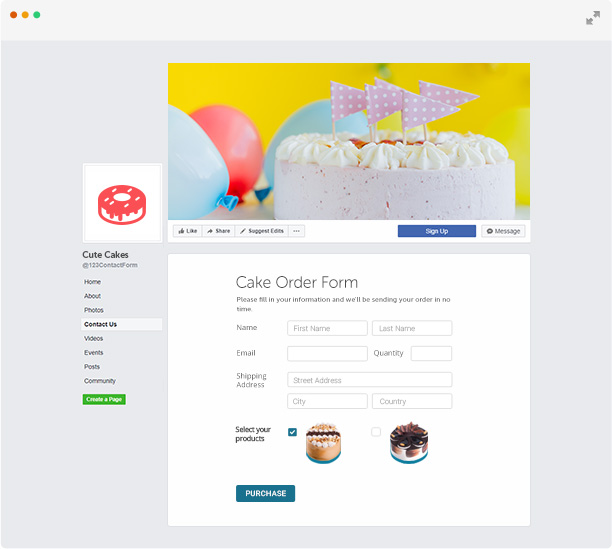
Want to know what your Facebook fans think? Just ask them.
The 123FormBuilder app for Facebook is the easiest way to build highly engaging Facebook contact forms that keep users on your page and collect their feedback fast. Our app gets your contact form on Facebook in minutes. Just add it to your Facebook page with a few clicks and pick the type of form you want to post. Check out our Facebook contact form tutorial if you need help building awesome web forms.

- Create your form in minutes & make it shine
It’s a snap to create a contact form for Facebook with our form creator. Simply drag and drop the fields you need and publish the form with our Facebook app. It’s that easy.
Design your Facebook contact form to fit your brand, without any coding. Our contact form builder lets you customize your contact form for Facebook with contact form templates, form themes, and custom CSS to match your brand identity.
- Respond to people fast & do more with form data
When Facebook fans contact you, find out right away with custom email notifications. Show your customers and fans you care with automatic responses that can even include download links and custom recipients.
Facebook form responses are stored in our secure online database, where you can view responses as custom charts and export information as CSV or PDF.
Turn your Facebook form into more than a communication channel. Are you selling products on your Facebook page? Then use 123FormBuilder to create a Facebook order form that you can add to your page and your fans will start shopping from you. Even better, you can integrate the order form with a payment gateway and receive payments on the spot.


- Fit Facebook into Your World
Get more out of Facebook form responses by connecting them to your CRM, marketing automation and social media management platforms, so you can keep building customer relationships over time.
Go the extra mile with your contact form solution for Facebook by adding advanced features like CAPTCHA support, Google Maps fields, file upload, custom logic rules (branching), submissions archives and more.
Ready to use templates
Select the type of form you need for your business below or browse through our complete form templates collection.
Conference Registration Form

Family Reunion Registration Form

Summer Camp Registration Form